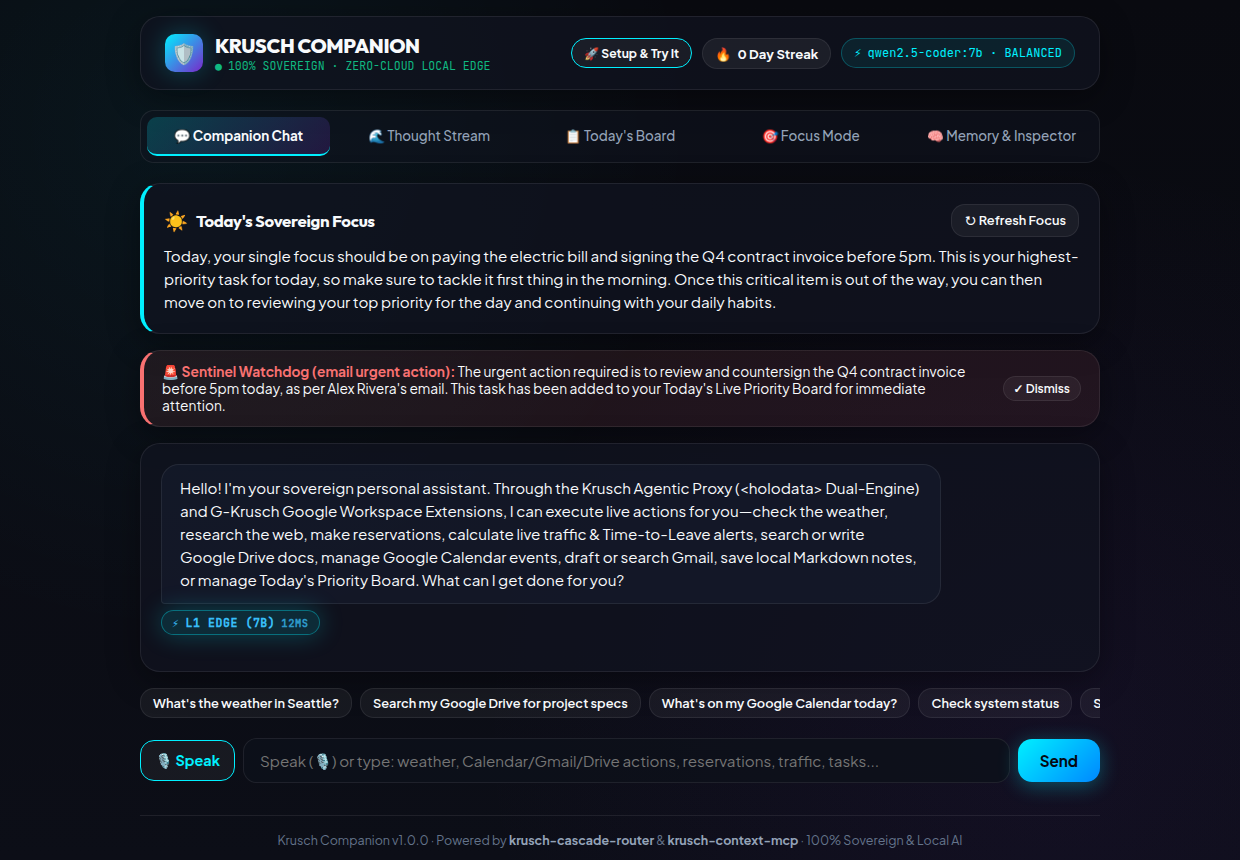
1. Why Use Krusch Companion? The Case for a Sovereign Personal Assistant
A true daily companion knows the most sensitive context of your life: the bills you cannot afford to miss, the client deliverables due before noon, your commute routes, your family commitments, and the unfiltered thoughts you speak aloud when your head is full.
Cloud-tethered consumer assistants (such as OpenAI Dot, xAI Grok Companion, or Meta Muse) treat that intimate context as telemetry. Even worse, most consumer assistants suffer from three structural flaws that make them frustrating to use day after day:
- Typing Friction Kills Capture: Nobody wants to type a 150-word paragraph of tangled errands, project ideas, and reminders on a keyboard when they are rushing out the door. If voice capture isn't instant and available everywhere, thoughts get lost.
- The "Priority Paradox" on Static Task Boards: Traditional productivity apps group tasks into static life categories (Health, Work, Home). When an urgent life obligation comes up—paying an insurance bill, calling a contractor, picking up a prescription—it gets buried beneath recurring daily habits ("Drink 2L of water", "Read 20 pages") simply because a habit category happens to sit at the top of the page.
- Memory Contradictions & Small-Model Tool Failures: Flat vector RAG retrieves outdated preferences right alongside your newest ones ("Prefers 9 AM meetings" vs. "No meetings before 11 AM"), and 7B–8B local models frequently hallucinate JSON arguments when handed 15+ tool schemas at once.
Krusch Companion solves all three problems while keeping 100% of your working memory, task board, and personal notes on your own disk in a single zero-configuration SQLite WAL database (.agent/companion.db) and local Markdown vault (data/notes/).
2. Core Features & Architecture Tour
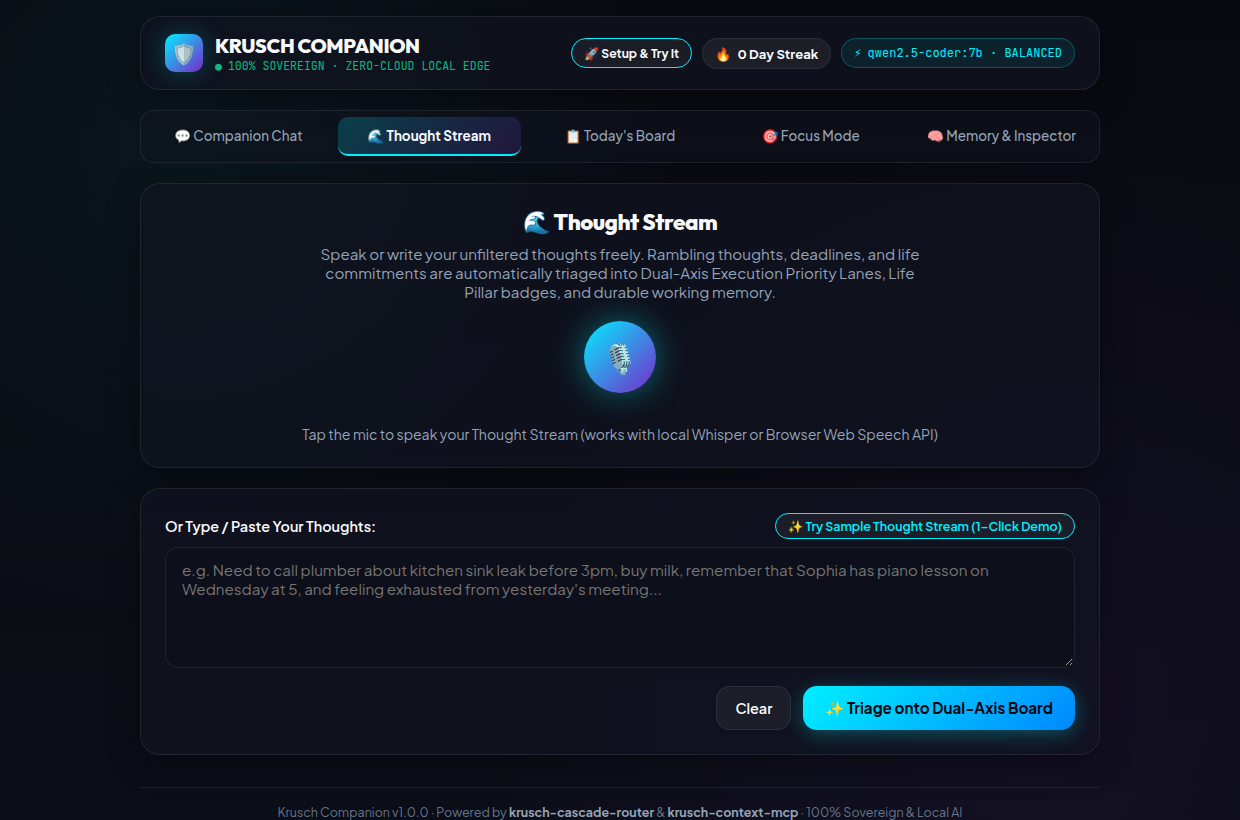
A. Voice-to-Text Everywhere (🎙️ Speak + Auto-Send on Stop)
Typing out complex thoughts or multi-part tool requests is high-friction. In Krusch Companion, voice capture is a first-class citizen across both the 💬 Companion Chat and the 🎙️ Thought Stream views:
- Live Browser Web Speech Dictation + Local Whisper STT Fallback: Click
🎙️ Speakto stream live words directly into your prompt box in real time, while simultaneously recording audio chunks for local Whisper STT verification (POST /api/companion/transcribe) with automatic 2-retry exponential backoff. - Hands-Free
Auto-Send on Stopin Companion Chat: ToggleAuto-Send on Stopnext to the microphone button. When enabled, clicking⏹️ Stopimmediately dispatches your spoken instruction to the Companion without touching the keyboard—whether you are asking "When do I need to leave for my 2 PM downtown meeting?" or "Prioritize task: Pay utility bill". - Deterministic Speaker & Intent Post-Processing: When you ramble a multi-sentence voice dump into the Thought Stream, the built-in post-processor (
postProcessTranscriptSegments) splits clauses and tags each sentence as[TASK],[MEMORY], or[NOTE]before the extractor even runs.
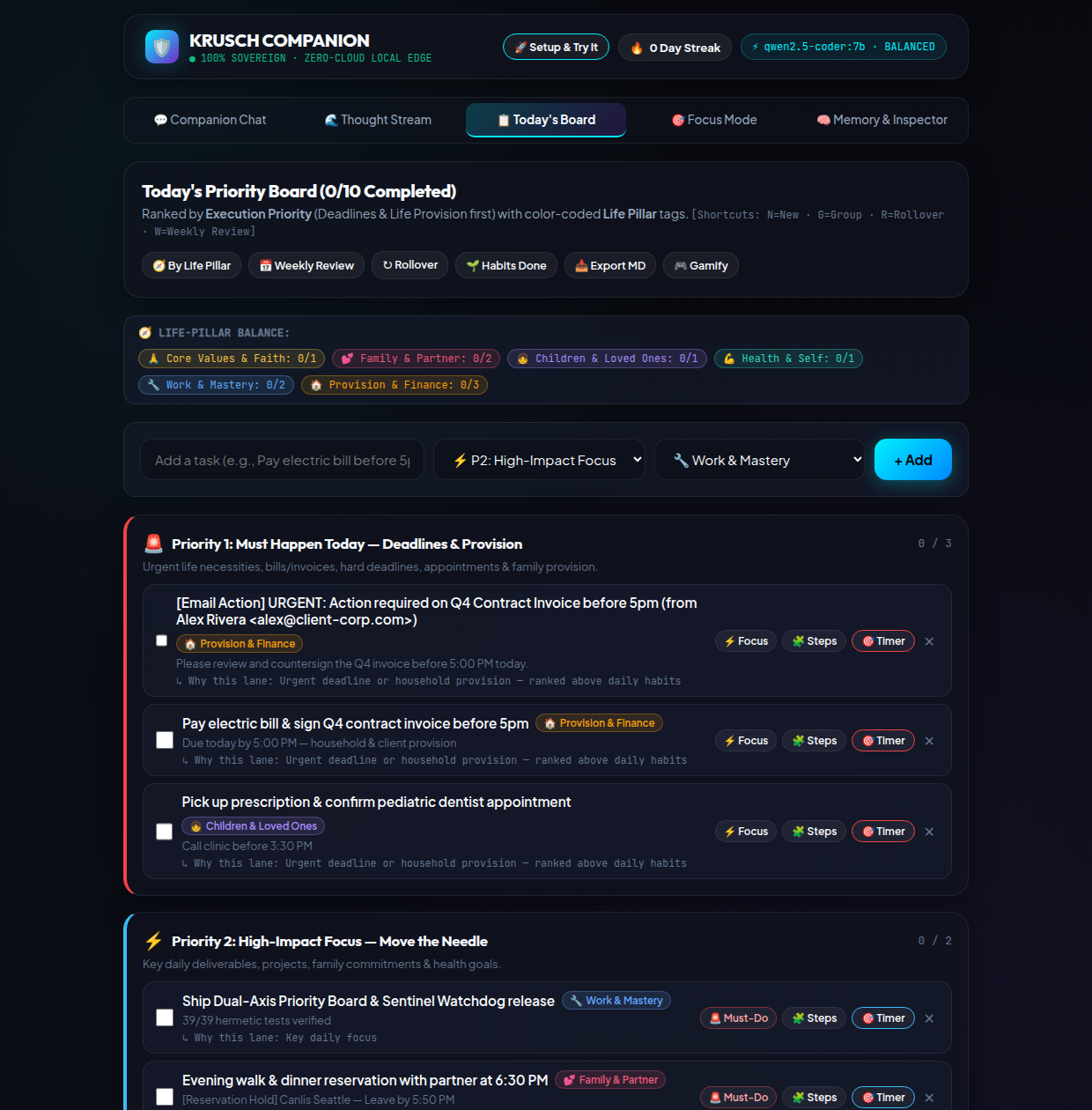
B. Solving the "Priority Paradox": The Dual-Axis Daily Board
When we dogfooded early versions of the board, we hit a classic failure mode: even if a life category like Deep Work or Health is important in the grand scheme of things, real life throws urgent, non-negotiable obligations at you that must happen today to keep life running smoothly.
Instead of forcing you to choose between organizing by urgency or organizing by life area, Krusch Companion's Today's Board uses a Dual-Axis Priority Matrix that separates when/how urgently you must execute from which pillar of life the task serves:
- Axis 1 — Execution Priority Lane (The Vertical Rows):
- Lane 1 — 🚨 Must Happen Today (Urgent Life & Provision): Deadlines, bills, family emergencies, time-sensitive errands, and critical client blockers. Always sits at the very top of your board.
- Lane 2 — ⚡ High-Leverage Deep Work (Move the Needle): Core engineering, creative output, and strategic deliverables once Lane 1 fires are handled.
- Lane 3 — 🌱 Daily Habits & Maintenance (Steady Anchors): Exercise, hydration, reading, and household upkeep—protected in their own lane so they never crowd out Lane 1 emergencies.
- Lane 4 — 📥 Backlog & Someday (Low-Pressure Parking Lot): Ideas and nice-to-haves parked safely out of your immediate visual field.
- Axis 2 — Life Pillar Badge (The Colored Context Pill on Every Card): Every task carries one of six Life Pillar badges—
🛡️ Life & Provision,❤️ Health & Body,🏠 Home & Family,💼 Deep Work & Career,🌱 Growth & Learning, or🤝 Connection—plus an explicit💡 Why this lane?rationale badge so you always see why the triage engine placed a task in Lane 1 vs. Lane 3.
C. The 16-Tool <holodata> Agentic Proxy, Google AP2 Payment Mandates & Google Wallet Passes
Krusch Companion isn't just a passive organizer—it is an active agent equipped with 16 sovereign tools spanning task mutation, memory storage, weather, web search, URL summarization, local Markdown notes, push notifications, live traffic & Leave-By departure alerts, concierge reservations (OpenTable/Resy deep links + Nominatim venue lookup), Google AP2 Cryptographic Payment Mandates (ap2_payment_mandate), Google Wallet Generic Pass generation (google_wallet_pass), and G-Krusch Google Workspace (Calendar, Gmail, and Google Drive RAG).
To make 7B–8B local models rock-solid at tool calling—and safe when handling reservations, emails, or payment mandates—the Companion uses four safeguards in src/agent/tools.js:
- Intent-Scoped Tool Pruning (~85% Schema Reduction): Instead of stuffing all 16 tool definitions into every prompt,
detectAgenticIntent(message)narrows the active schema window to the 1–3 relevant tools for your query. - Dual-Engine
<holodata>Extraction + Confidence Scoring: The model first reasons inside a structured<holodata>cognitive scratchpad before emitting flat tool JSON, backed by a deterministic regex fallback layer (inferFallbackToolCalls) that works even if the LLM is completely offline. - 💳 Google Agent Payments Protocol (
AP2) & Spend-Capped Virtual Cards: Asking "Authorize a $65 payment mandate for Seattle City Light" constructs a verifiable 3-part Google AP2 Mandate Bundle (IntentMandate+CartMandate+PaymentMandatewith a Google Pay v2.0PaymentDataRequestpayload), signs it withHMAC-SHA256, and optionally mints a single-use, merchant-locked virtual card via Privacy.com (PRIVACY_API_KEY) so an agent can never exceed your exact dollar ceiling. - 📲 Google Wallet Generic Pass Issuer: Every restaurant reservation or time-critical appointment can be pushed to your phone via
google_wallet_pass—generating a standards-compliant Google WalletgenericObjectspass (signed with RS256 JWT whenGOOGLE_WALLET_ISSUER_IDis configured, or a zero-config mobile Calendar/Wallet pass card out-of-the-box) complete with QR barcode,LEAVE BYdeparture time, and 1-click OpenTable/Maps links. - 🛡️ Confirm-Before-Act (
dryRunMode) for Side-Effect Tools: High-impact side-effect tools (ap2_payment_mandate,concierge_reservation,gkrusch_gmail,gkrusch_calendar,send_notification) are intercepted before execution when the 🛡️ Confirm Side-Effects toggle is active, staging a preview card with a✅ Confirm & Executebutton so a model never mutates your calendar, sends an email, or issues a payment mandate without your explicit approval.
D. Multi-Channel Proactive Sentinel Watchdog ($0.00 CPU Polling)
Most "proactive" AI agents burn thousands of tokens every few minutes polling an LLM to ask "Should I notify the user?" Krusch Companion's Sentinel Daemon (src/sentinel.js) runs a zero-token CPU check every 5 minutes across three channels:
- Channel 1 — Gmail Unread Watch: Flags new unread messages from priority senders.
- Channel 2 — Calendar Conflict & Imminent Event Watch: Detects overlapping events or meetings starting within
<120 minutes. - Channel 3 — Commute Traffic Spike Watch: Alerts you when live traffic adds
>=10 minutesof delay to your upcoming destination and recalculates your exact Leave-By time.
The LLM is only woken when a deterministic state delta is detected—keeping idle background cost at $0.00/day.
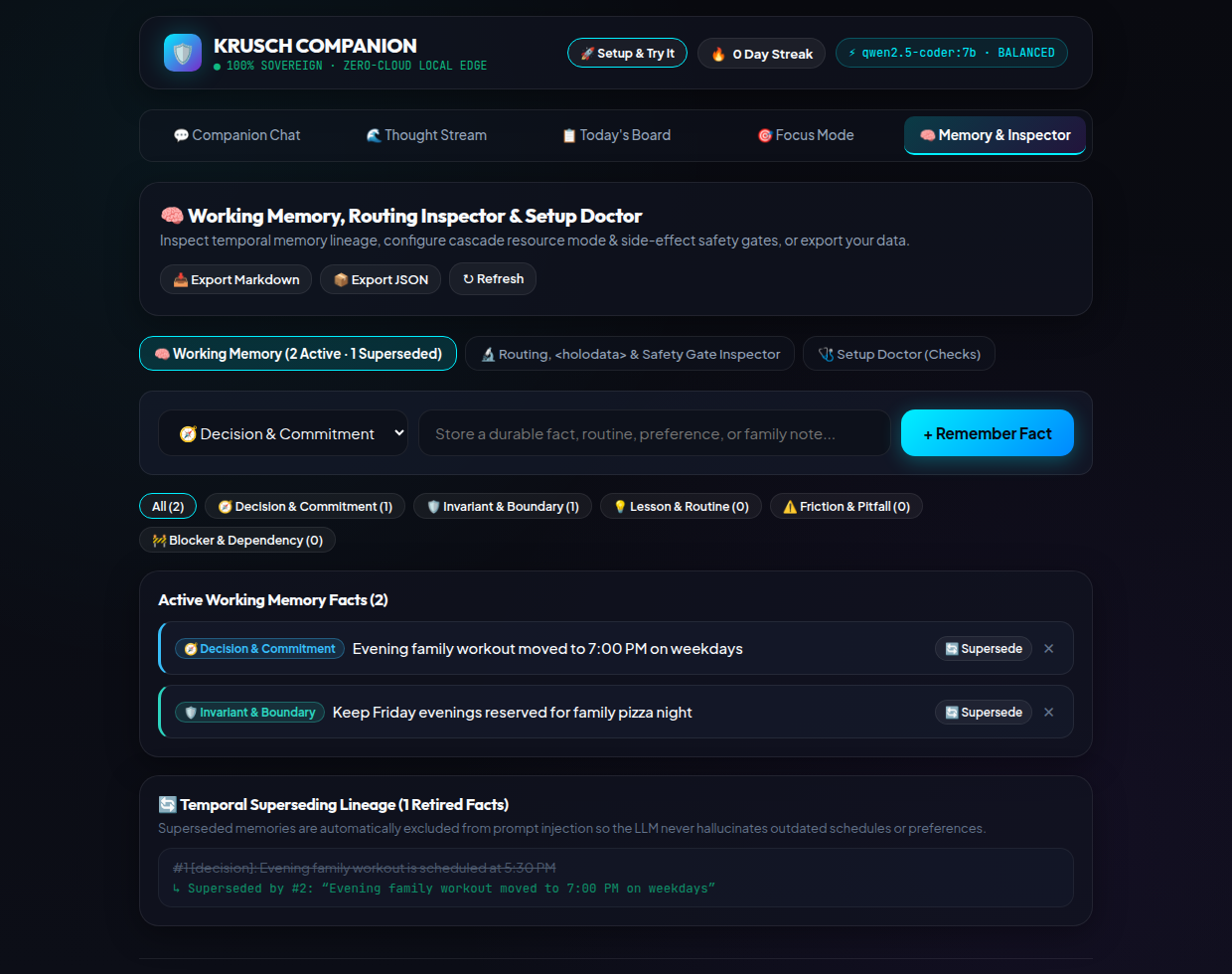
E. KruschContext Working Memory & Temporal Fact Superseding
When your schedule or habits change, you shouldn't have to manually edit a system prompt. In Krusch Companion, saying "Instead of 9 AM standups, remember that standups moved to 10:30 AM" automatically triggers Temporal Fact Superseding in SQLite: the old memory is marked status = 'superseded' with a cryptographic lineage pointer (superseded_by / supersedes_id) to the new fact.
3. Step-by-Step Setup Guide: 3 Ways to Run Krusch Companion
Krusch Companion is packaged as a zero-external-dependency standalone repository with vendored local modules in packages/. All you need is Node.js 22.5+ (which includes the native node:sqlite engine built in).
Step 1: Clone, Build & Run the Readiness Doctor
git clone https://github.com/kruschdev/krusch-companion.git
cd krusch-companion

# Install dependencies and build the React 19 PWA frontend
npm install
npm run build

# Copy the example environment file and run the interactive Doctor check
cp .env.example .env
npm run doctor
The npm run doctor CLI verifies your Node.js version, SQLite WAL permissions, frontend bundle, and whether Local Ollama or OpenRouter is reachable. Next, choose the runtime path that fits your hardware:
| Setup Path | Best For | Required Config in .env |
Daily Inference Cost |
|---|---|---|---|
| Path A: 100% Local Ollama | Desktops, homelabs, or laptops with 8GB+ RAM/VRAM seeking total offline sovereignty | OLLAMA_HOST=http://127.0.0.1:11434COMPANION_L1_MODEL=qwen2.5-coder:7b |
$0.00 / day (100% local) |
| Path B: Zero-GPU OpenRouter Cascade | Ultrabooks, MacBooks, or VPS nodes without a dedicated GPU | OPENROUTER_API_KEY=sk-or-v1-...OPENROUTER_ZDR=true |
~$0.01–$0.04 / day (Zero Data Retention enforced) |
| Path C: Docker Compose Stack | Always-on home server deployment with bundled Ollama service | docker compose up -d --build |
$0.00 / day |
Starting the Server
# Start Krusch Companion on http://localhost:3004
npm start
Open http://localhost:3004 in any desktop or mobile browser. Because Krusch Companion ships with a Service Worker and Web App Manifest, you can click "Install App" (or Add to Home Screen on iOS/Android) to run it as a standalone native-feeling PWA.
4. Your First 10 Minutes: How to Use Krusch Companion Efficiently
To get maximum leverage out of Krusch Companion from day one, follow this four-step workflow during your first 10 minutes:
Click 🚀 Setup & Try It in the top header. Pick your Resource Mode (⚡ Minimal CPU, ⚖️ Balanced, or 🧠 Quality) and click ✨ Load Sample Thought Stream. Watch it instantly populate the Dual-Axis Board so you see how lanes and pillars work before entering your own data.
Press Alt+3 to open Thought Stream, click 🎙️ Speak, and talk naturally for 30 seconds: mention a bill you need to pay today, a project task, a daily habit, and a personal preference. Click ✨ Extract Tasks & Memories.
Press Alt+2 to view Today's Board. Notice how urgent obligations landed in Lane 1 (🚨 Must Happen Today) while recurring routines landed in Lane 3 (🌱 Daily Habits). Hover or inspect the 💡 Why this lane? badge on each card.
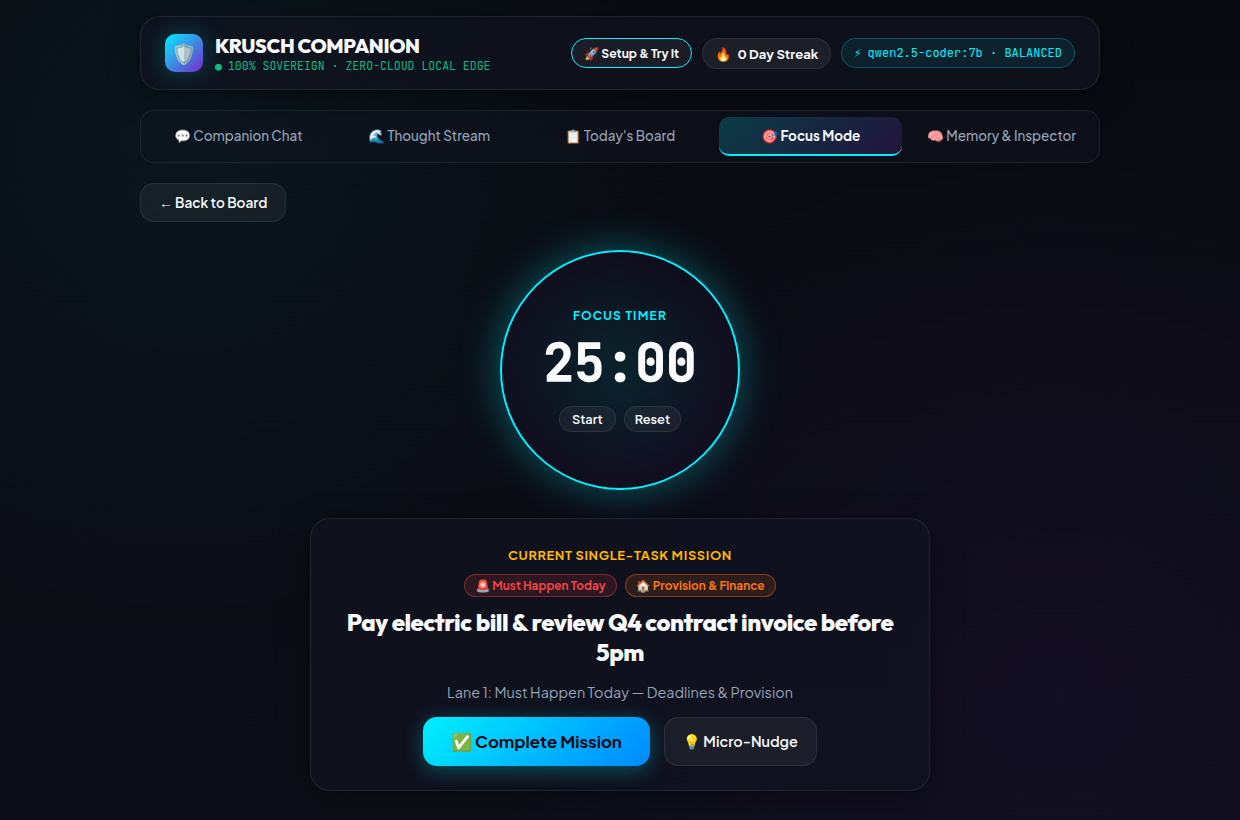
Click 🎯 Focus on your #1 Lane 1 task. The full-screen Focus Mode hides the rest of your backlog, starts a 25/45/60-minute countdown timer, and lets you mark the task Done or Snooze it with a single click.
5. The Power-User Playbook: Pro Tips for Daily Efficiency
Tip 1: Use the <15µs L0 Voice & Chat Prefixes for Instant Zero-Token Mutations
You don't need to wait for an LLM generation to add a task, reprioritize an item, or update a memory. Whenever you type or speak these natural prefixes in Companion Chat (Alt+1), the L0 Deterministic CPU Fast-Path executes them in under 15 microseconds at $0.00 cost:
# Instant Task Creation (<15µs L0 Fast-Path)
"Add task: Pay property tax installment before 5 PM"

# Instant Lane Escalation (<15µs L0 Fast-Path)
"Prioritize task: Pay property tax installment"

# Instant Task Completion (<15µs L0 Fast-Path)
"Complete task: Pay property tax installment"

# Instant Temporal Memory Superseding (<15µs L0 Fast-Path)
"Instead of 9am standups, remember that daily standup is now at 10:30am"
Tip 2: Use Keyboard Shortcuts on Today's Board
You can triage your entire board in seconds without touching the mouse:
- Top-Level Navigation: Press
Alt+1(Companion Chat),Alt+2(Today's Board),Alt+3(Thought Stream),Alt+4(Briefings), orAlt+5(Working Memory Inspector). - Card-Level Speed Keys: Focus any task card on Today's Board with
Tab, then press1,2,3, or4to move it directly to Lane 1–4, pressdto mark it Done, or presssto Snooze it out of today's view. - Bulk Triage Bar: Check multiple tasks across any lane to batch-move them to Lane 1 (Must Today), batch-snooze them, or batch-complete them in one click.
Tip 3: Follow the 4-Habit Daily & Weekly Rhythm
- Morning (2 mins): Open 🌅 Briefings (
Alt+4) and generate your Morning Focus Briefing. Check Companion Chat for any proactive Sentinel Watchdog alerts (calendar overlaps or traffic Leave-By changes). - Midday Capture (30 secs as needed): Whenever new tasks or ideas pop up, hit
🎙️ SpeakwithAuto-Send on Stopin Companion Chat or Thought Stream instead of letting open browser tabs pile up. - Afternoon Execution: Work strictly top-down from Lane 1 (🚨 Must Happen Today) before touching Lane 2 (⚡ Deep Work) or Lane 3 (🌱 Daily Habits).
- Friday / Sunday Review (3 mins): Open the 📊 7-Day Weekly Review panel on Today's Board to inspect your Life Pillar balance, click
🔄 Roll Over Snoozed to Today, and check 🧠 Working Memory (Alt+5) to retire or supersede stale context.
6. Explore & Run Krusch Companion Today
Krusch Companion is MIT-licensed and available today on GitHub with full unit, integration, and benchmark evaluation suites (npm test and npm run eval).
